Linux Shell Scripting
Shell scripting for DevOps.
A shell is a command-line interpreter and typical operations performed by shell scripts include file manipulation, program execution, and printing text.
For aspiring DevOps engineers, it is essential to know shell Scripting or bash scripting.
Is scripting required for DevOps Engineers?
Yes. Scripting knowledge is very essential for a DevOps engineer. For the development environment till production, a DevOps engineer might have to create useful utilities using scripting.
Enough said, let's dive into writing our first shell script.
The below shell script, when executed prints I will complete #90DaysOofDevOps challenge
First, create a .sh file. I have created demo.sh file using vi editor.
vi demo.sh
This will create a file, now press i to write the shell script.
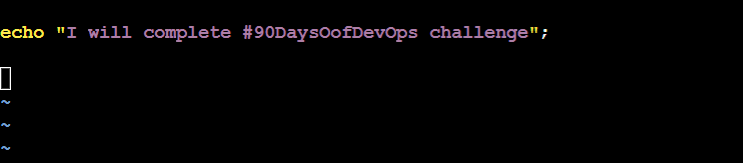
echo command will just output what you want to show when the script runs.
Mention the message in " " and end it with ;
Save the file, by pressing ESC and then type :wq followed by Enter key
To run the script, check below:
Execute script using ./<filename>
Make sure you have given execute permission to the file before execution, if not use the below command to change it.
chmod +x <filename>

Yay!!, that ran successfully!
Now, let's make it a little complex. Let's write a shell script to take 2 numbers from the user and compare the two:
In this, we will make use of if-else
if [condition]
then statement1
else statement2
fi
Here, is the shell script that I've written to compare two numbers.
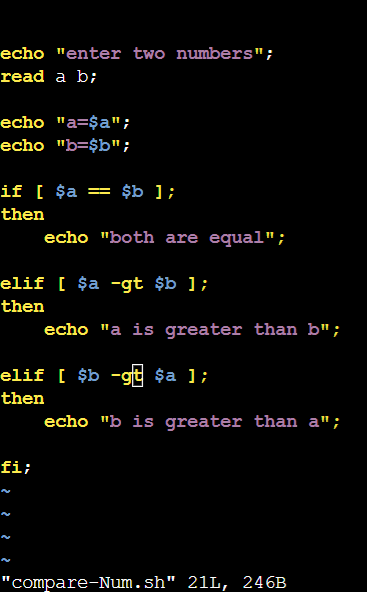
It meets all 3 conditions if a>b, b>a, a=b
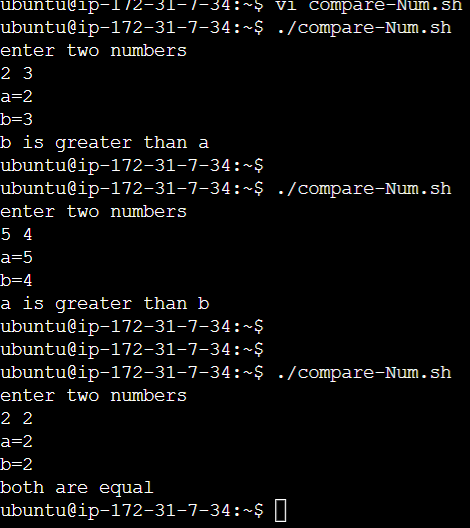
That's a wrap for today, hope you found it useful.
The confidence you get after practising is unbeatable.
Comment, share and like! Happy learning!!


